


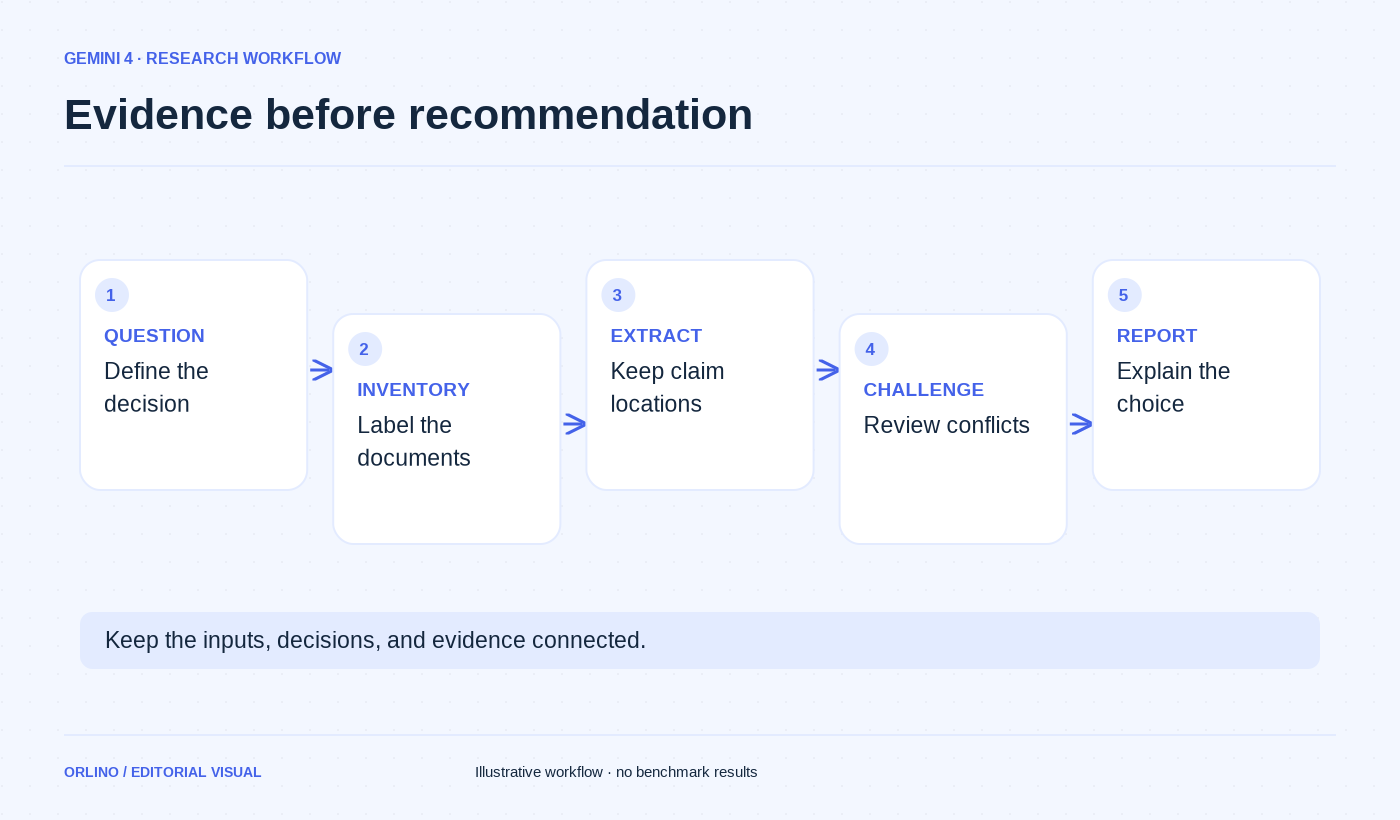
To use Gemini 4 for research, begin with a question that can be answered from identifiable sources. Build an evidence table before asking for a polished report, separate verified information from inference, and inspect the citations behind any recommendation that matters.
That workflow gives you something to review beyond fluent prose. You can see which documents support the answer, where sources disagree, and what information is still missing.
The method below is an illustrative process for evaluating an AI-assisted research task. It is not a report of a completed Gemini experiment.
For specifications and access considerations, see the Gemini 4 model guide.
1. Define the decision and its boundaries
“Research the best tool” leaves too much undefined. Write the decision in terms of the person making it, the constraints they face, and the evidence they need.
For example:
Compare three project-management tools for a small design team. Focus on client access, export options, integration requirements, and annual costs. Separate documented features from claims that require a trial. Do not recommend a tool until missing information is listed.
This is a hypothetical assignment. The team size, options, and constraints should come from your actual situation rather than a generic template.
Set a date boundary as well. A current decision may depend on recent documentation, while a historical question may require sources from a specific period.
2. Prepare a source inventory
Collect the material you are authorized to use. Give each source a name, date, location, and reason for inclusion. Record whether you have the full text or only an excerpt.
Gemini 4's official model listings include several input types, including PDF and video. Check what your chosen interface actually accepts before designing the assignment around those inputs. Gemini model directory.
If your environment includes browsing or search tools, record the pages retrieved. If it does not, provide the source material yourself. Do not treat a generated citation as proof that a page was opened or read.
For pricing questions, collect the relevant billing period, currency, seat assumptions, and access tier. A monthly headline price and an annual invoice are not interchangeable inputs.
3. Extract evidence before writing the conclusion
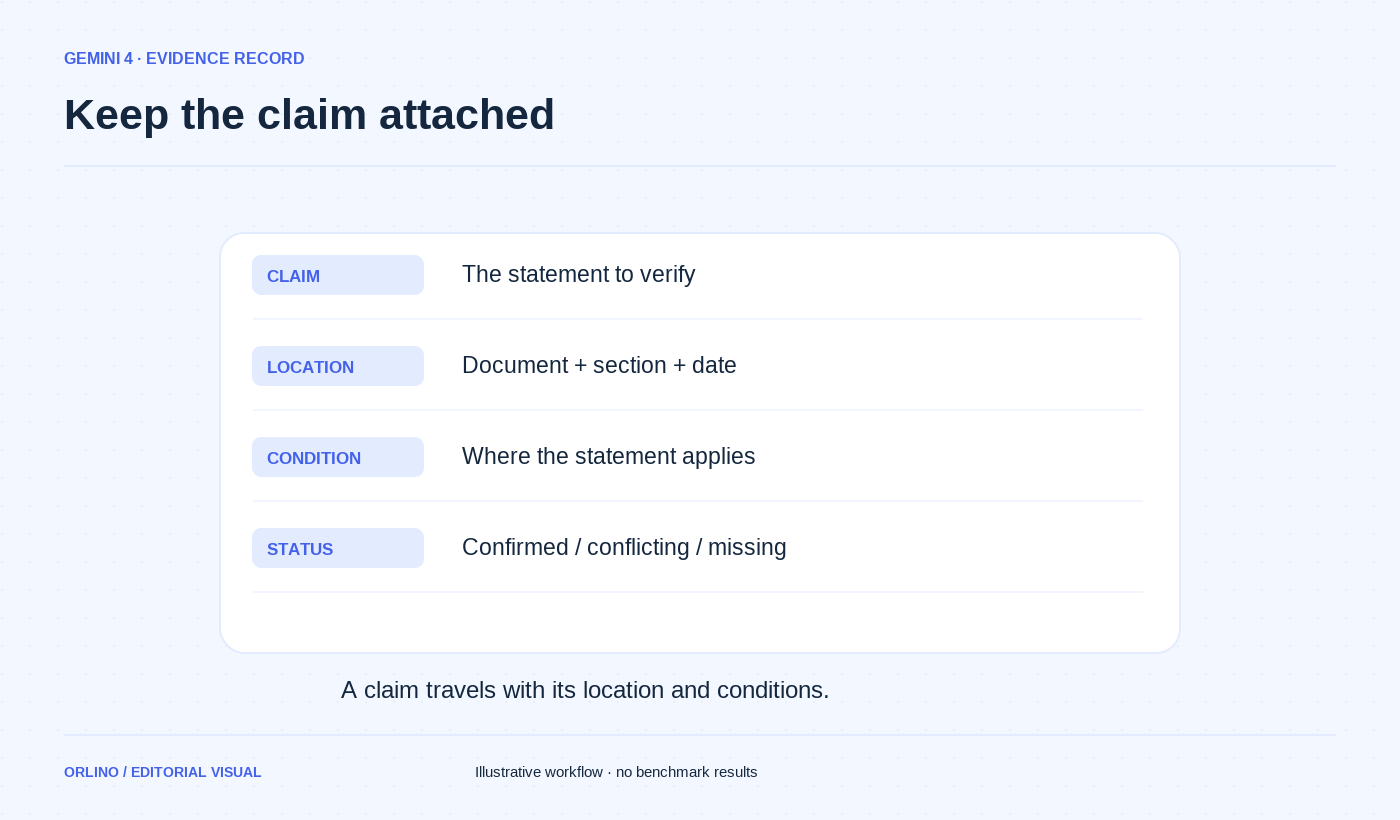
Ask for a structured record first. The following table describes the fields to request; it does not contain fictional findings.
| Field | What it should contain |
|---|---|
| Claim | One specific statement being checked |
| Supporting source | Document name and URL or file location |
| Location | Page, section, timestamp, or other usable reference |
| Date | Publication or update date, when available |
| Conditions | Relevant plan, region, version, or exceptions |
| Verification state | Verified, unresolved, or contradicted, with a reason |
Avoid a numerical confidence score unless you have a defined, defensible method for producing it. A short explanation of missing evidence is often more useful than a precise-looking percentage.
Use a prompt such as:
Build an evidence table from the supplied sources.
For each claim, identify the exact supporting location and its conditions.
Keep direct source statements separate from your inferences.
Mark unresolved questions explicitly.
Do not fill missing information from memory or invent references.
When the inventory includes reports, use the Gemini 4 PDF analysis guide to preserve table structure and page references.
4. Challenge the evidence table
Review a sample before requesting a full report. Open the cited locations and check that they support the entire claim, including its exceptions.
Then ask for an adversarial review:
Review this evidence table for unsupported conclusions.
Identify conflicting dates, omitted conditions, and claims whose citations
support only part of the statement. Explain what evidence could change
the recommendation. Do not assume the first analysis is correct.
You can evaluate Carbon on difficult unresolved analysis while retaining an Argon baseline. Google's positioning distinguishes Argon for general knowledge work from Carbon for more demanding reasoning and research. That is a starting point for your test, not evidence that a model switch verifies the report. Google's Carbon announcement.
5. Write the report around the decision
Once the evidence has been checked, ask for a report with a direct answer, a comparison using your stated criteria, the main trade-offs, and unresolved questions that could change the decision.
Keep citations next to the claims they support. Put a source's limits in the analysis: for example, whether a feature is documented but untested, or whether a quoted price excludes an important condition.
A useful recommendation explains what the reader should verify next. “Run a trial to check client permissions” is more actionable than a generic instruction to do more research.
Turn a broad research request into an answerable assignment
Before collecting more sources, identify the decision the report needs to support. A request to “research AI tools” can expand without producing a usable answer. A request to compare export options for a defined workflow gives the research a boundary and a reason to stop.
Separate must-have requirements from preferences. A tool that cannot export the required format may be unsuitable regardless of its other features. Write down the conditions that could disqualify an option and the information needed to check them.
Then define the deliverable. A buyer may need a comparison table and a shortlist. A project lead may need an implementation plan with dependencies. A researcher may need competing explanations and evidence gaps. The requested output should reflect that decision rather than defaulting to a long general essay.
The Carbon vs Argon comparison helps choose a model for the difficult parts of evidence review.
Build a source hierarchy for the specific question
Different sources can answer different parts of an assignment. Product documentation can describe supported behavior, pricing terms can define billing conditions, and an authorized internal test can show what happened in your own environment. Keep those roles visible.
For a feature claim, look for documentation that identifies the relevant version or plan. For an actual workflow claim, look for a reproducible procedure and recorded result. A launch announcement can establish what was announced, but it may not resolve every current implementation detail.
When a source has an incentive to present its product favorably, use it for the claims it can support and identify where independent verification is needed. Do not silently convert a company's performance statement into your own measured finding.
Ask Gemini to preserve the source category in the evidence table. That lets the reader distinguish a documented capability, a developer claim, a calculation, and an observed result.
Worked example: resolve a pricing inconsistency
The following scenario is fictional and illustrates a verification process, not the pricing of a real product.
Suppose a comparison page displays a monthly rate, while a pricing page describes an annual commitment and a separate document specifies a minimum seat count. A report that copies the first number may miss the conditions that determine the actual purchase.
Ask the model to identify the billing period, minimum quantity, currency, and exclusions for each source. If one condition is missing, keep it unresolved. Calculate a comparable annual total only after the inputs have been established, and show the formula so another person can repeat it.
| Question | What the researcher should establish |
|---|---|
| What is being priced? | Named plan, version, or usage unit |
| Which period applies? | Monthly billing, annual commitment, or another basis |
| What quantity is required? | Seats, minimum spend, or included usage |
| What is excluded? | Extra usage, add-ons, taxes, or other relevant conditions |
| Is the information current? | Source date and applicable effective period |
If the evidence remains inconsistent, the useful output is a precise verification question for the vendor. The report should not invent a missing condition to make the table look complete.
Handle conflicting dates and superseded information
Record both the publication date and any effective date. An announcement about a future change can coexist with documentation describing the service before that change takes effect. The apparent conflict may disappear once the dates are separated.
Use a short chronology when the answer depends on a rollout. Identify the initial announcement, subsequent access changes, and the current documented position. Explain which event supports your statement instead of treating every retrieved page as equally current.
When the date cannot be established, label that limitation. Ask what additional source would settle the question. This is more useful than applying a confident “latest” label to material whose status is unclear.
Make citations useful to the reviewer
A citation should help someone check the claim efficiently. For a web page, include the relevant section. For a PDF, record the document version and page. For a video or recording, identify the timestamp supporting the point.
Check the scope of support. A source describing a feature on an enterprise plan does not necessarily support a claim about every plan. A page confirming that an API exists does not establish that a third-party application exposes it.
For recommendations, cite the premises that drive the decision. The reader needs to see why an option meets or fails an important requirement. Repeating a home-page link beside every sentence adds less value than a precise reference at the relevant claim.
Keep facts, calculations, and judgments separate
Mark a factual statement with its source. Show the inputs and formula behind a calculation. Explain the criteria behind a judgment. These three kinds of content can appear in one report, but the reader should be able to tell which is which.
For example, whether a tool exports a file type is a feature question. The total annual charge under stated assumptions is a calculation. Whether that tool is suitable for the team is a judgment that also depends on the team's requirements and trade-offs.
Ask the model to identify which change in the inputs would alter the recommendation. This reveals whether the conclusion depends on a well-supported requirement or an assumption that needs more work.
Package the report so it can be updated
Keep the source inventory, evidence table, calculation inputs, unresolved questions, and final report together. Save the research date and the model environment used, including any relevant tools or limits.
When information changes, update the affected evidence before rewriting the recommendation. A revised price may alter a cost comparison without changing the feature assessment. A changed export limit may affect suitability even if the subscription price remains the same.
Assign an actual reviewer where the decision requires one. The AI can prepare the record, but it should not invent a human approval or imply that an unreviewed recommendation has been adopted.
6. Perform the final review outside the narrative
Check the calculations against the inputs. Open the citations behind the recommendation. Look for inconsistent dates, mismatched product versions, and conclusions that became stronger than their supporting evidence.
Keep a short research log containing the model and environment, the source set, the review date, and remaining gaps. This makes later updates possible without rebuilding the report from memory.
The finished result should make its evidence inspectable. A reader should be able to understand why the recommendation was made and what new information would change it.
For related workflow options, explore Orlino's model overview. Confirm the available models and connected tools before transferring this process into a particular application.
Conclusion
A useful Gemini 4 research workflow makes the evidence behind a decision easy to inspect. Define the question, organize the sources, extract claims with their conditions, and challenge the analysis before requesting the final report. Preserve uncertainty wherever the material does not support a complete answer.
Use the report to identify a justified next action: choose a shortlist, run a targeted trial, obtain a missing document, or confirm a disputed condition. Keep the evidence and calculations with the conclusion so the work can be reviewed and updated. The result should help a reader make a better decision and understand what information could change it.
FAQ
Which Gemini 4 model should I use for research?
Choose a starting model based on the task and the constraints of your environment. An Argon baseline can help you evaluate a defined research workflow, while Carbon can be tested on difficult unresolved analysis. Compare the accepted result and full cost rather than assuming the model name determines research quality.
Can Gemini 4 research the web automatically?
That depends on the application and the enabled retrieval tools. Check what the environment can access and record which sources it actually retrieved. When working from supplied files, state that scope explicitly. A generated URL or citation is not evidence that the underlying page was opened.
How do I check whether a citation supports an answer?
Open the cited location and compare it with the full claim. Check the date, applicable conditions, and any exceptions. A source can support part of a sentence while leaving its broader conclusion unproven. Correct or narrow the claim when the support is incomplete.
Can I research long PDFs with this workflow?
Google lists PDF input for Gemini 4 Carbon and Argon. Check the limits of the interface you use, preserve document names and versions, and ask for page-level references. Sample important claims against the original document before relying on the report. Gemini model directory.
How should the report handle missing information?
State what is missing, why it matters, and what evidence would resolve it. Keep the recommendation conditional when the gap affects the decision. An explicit unresolved question helps the reader take action; an invented value can make an otherwise polished report misleading.
Should I ask for a confidence percentage?
Use a percentage only when you have a defined method that makes the number meaningful. For most document-research assignments, a verification state with an explanation is easier to audit. Record whether the claim is supported, contradicted, or unresolved and identify the reason.
Is a second AI review enough to verify the report?
A second review can identify issues to investigate, but it can also miss errors or inherit the first analysis's assumptions. Verify consequential claims against original sources, repeat calculations, and obtain the relevant human review when the decision requires it.
How often should I update an AI-assisted research report?
Update it when information material to the decision changes. Pricing, availability, plan conditions, and product behavior can change on different schedules. Keep a review date and identify the assumptions most likely to require rechecking before the report is used again.