


Gemini 4 Neon: spreadsheet analysis review — What the published evidence supports
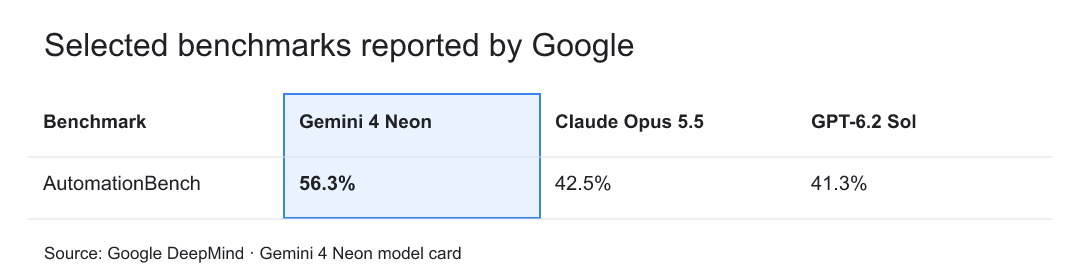
The table shows provider-reported scores under the settings described by Google. The displayed rows have different tasks and denominators. Keep the benchmark name and version with any number you quote. If a score is missing, leave it blank in the comparison and use the shared rows as the basis for interpretation.
Seed a workbook with one duplicate identifier and one refund booked after month end. Keep a separate sheet with verified expected totals by month and department. Use this as the answer key and remove it from the input you give the model. Changing data in a shared workbook is unnecessary for the first evaluation.
Sources: Google’s Neon announcement · DeepMind’s Neon model card
Define the decision and a passing result
A finance analyst reconciles subscription revenue across raw events and a monthly rollup.
Write one line that explains what a reviewer must see to accept the result. For this case, check formula references, reconciliation, and edge-case handling. Keep the success rule in the worksheet next to the input revision. A person reading the record should be able to tell why an output passed without being told which model produced it.
Use a routine version of the revenue reconciliation case first. Then change one condition to make the easy answer invalid. The example to look out for is this: the model produces the right grand total but assigns the refund to the wrong month. Write the expected response before trying either candidate. Use a second, held-out input if you adjust the prompt after looking at the first result.
Prepare the evaluation in a sandbox or copy of the working files. Preserve the original form of the input alongside any text extraction, summary, or manual cleanup. If preprocessing is necessary, repeat it for each candidate and record whether a human or a tool performed it. Report the work required to prepare the input alongside the work required to approve the output.

Run the example on a fixed input
Include refunds, a duplicate transaction ID, and a record booked across a month boundary.
Look at recalculation behavior, not just reported values. A written explanation with correct totals may coexist with a formula referencing a hardcoded range. Add a new row and see whether the formula still includes it. A reviewer should also verify that the formula distinguishes missing values from transactions with an actual zero.
For the initial request, use this instruction as a starting point: “Include refunds, a duplicate transaction ID, and a record booked across a month boundary. Explain which input supports each consequential claim or calculation. List any required checks you could not perform, and state what would let a reviewer finish the job.” Keep the instruction with the saved run so reviewers can distinguish a missed requirement from an unstated expectation.
Save the first response, the correction history, and the final output. Record which important claims or actions a reviewer found unsupported. If the task relies on a tool, preserve the relevant tool result next to the output. A result awaiting a missing source belongs in a separate status from an accepted result. Include timeouts and abandoned attempts in the sample, since excluding them changes the denominator.
Have a second reviewer grade at least the ambiguous cases before resolving disagreements. Start with the answer key and the actual artifact. For an unexpected but valid answer, update the rubric in a new version and either regrade the existing sample or reserve the change for a later round. Preserve the original results so improvements in the scoring rules remain visible.
Read the result and investigate misses
For chart summaries, compare the chart’s source range and chosen filter with the workbook totals. A chart can tell a true but incomplete story if an adjustment is missing from its range. If a human spends longer inspecting the changes than preparing the summary manually, record that as a meaningful operating cost.
Use a small table with one row per task and candidate. Record the rubric outcome, severe defects, time to first response when it matters, time to an accepted output, and number of follow-up turns. Mark runs in which the tools or instructions differed. For repeated runs of the same task, retain every outcome and note whether the same issue returned. Treat a strong result on one sample as a reason to test it again on an independent case.
The model produces the right grand total but assigns the refund to the wrong month.
Review critical failures on their own. Put errors with clear evidence in one column and disagreements about wording or preferences in another. If the trial produces a mixture of successes and failures, report cases where the workflow can already be used, along with the controls it needs. A single average can hide a serious error that occurs on a small class of tasks.
Decide whether to adopt the workflow
Compare output cells and change history before using the model to modify a workbook.
A trial can show that one candidate performed better on your task without establishing that it wins on every task in the same category. Keep the original inputs and version information, and record which cases fall outside the trial. If both candidates fail the same requirement, look at what the inputs or tools expose before concluding that a larger model would resolve it.
Name the person responsible for reviewing the result and the date you will revisit it. Keep one accepted and one rejected sample as references. A future model revision, revised billing entry, or change in the input mix is a good reason to run the checks again. When the evidence supports only a narrow change, document the task that qualifies and keep the existing process for the rest.
Conclusion
A spreadsheet evaluation needs a verifiable workbook and a reconciliation target. Google’s AutomationBench result provides general task evidence; a workbook-specific pilot should check formulas, units, and exceptions.
Compare output cells and change history before using the model to modify a workbook.
Frequently asked questions
What should I check first for spreadsheet formulas and error checks?
Include refunds, a duplicate transaction ID, and a record booked across a month boundary.
How should I handle a failed example?
The model produces the right grand total but assigns the refund to the wrong month. Record the discrepancy and the relevant input or usage record. Require another run on a fresh case before changing the decision.
Can I apply these findings to another setup?
A trial can show that one candidate performed better on your task without establishing that it wins on every task in the same category. Keep the original inputs and version information, and record which cases fall outside the trial. If both candidates fail the same requirement, look at what the inputs or tools expose before concluding that a larger model would resolve it.
Keep reading
Gemini 4 Neon: switching from Gemini 3.5 Flash
Gemini 4 Neon: switching from Gemini 3.5 Flash. Compare the options on the same inputs and use a workflow checklist to decide when to switch.
Read article Gemini 4 NeonGemini 4 Neon: tool use and recovery
Gemini 4 Neon: tool use and recovery. Assess published benchmarks and use a practical checklist to verify results on your own tasks.
Read article Gemini 4 NeonGemini 4 Neon: API token pricing
Gemini 4 Neon: API token pricing — Explore API token pricing with a practical token rate calculation example, checks for common mistakes, and a decision guide.
Read article