


Gemini 4 Neon: API token pricing — What the published evidence supports
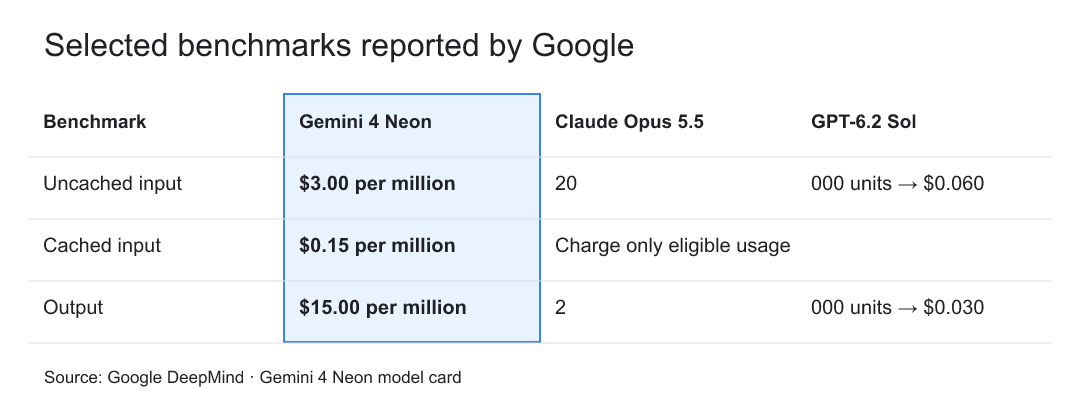
The table shows provider-reported scores under the settings described by Google. The displayed rows have different tasks and denominators. Keep the benchmark name and version with any number you quote. If a score is missing, leave it blank in the comparison and use the shared rows as the basis for interpretation.
Keep uncached input, cached input, and billed output in their own columns. If you observe a mixture of cached and uncached input, use the API’s usage fields and avoid adding cached input twice when the total input already includes it. Record the rate source, currency, endpoint, and date on the same worksheet.
Sources: Google’s Neon announcement · DeepMind’s Neon model card · Gemini API pricing documentation
Define the decision and a passing result
A developer needs to budget a request containing 20,000 uncached input and 2,000 billed output tokens.
Write one line that explains what a reviewer must see to accept the result. For this case, check metered units, dated rate, and cache status. Keep the success rule in the worksheet next to the input revision. A person reading the record should be able to tell why an output passed without being told which model produced it.
Use a routine version of the token rate calculation case first. Then change one condition to make the easy answer invalid. The example to look out for is this: a budget counts all 20,000 tokens at the cached rate even though the request does not produce a cache hit. Write the expected response before trying either candidate. Use a second, held-out input if you adjust the prompt after looking at the first result.
Give each example a common denominator before comparing cost. Decide whether you are forecasting per attempt, per accepted result, per user, or per month. Keep the currency and units beside the number. In a shared spreadsheet, store per-million rates as separate cells and make the unit conversion explicit, so another person can audit the arithmetic.

Run the example on a fixed input
Multiply metered units by the applicable per-million rate and sum the line items. That example is $0.060 plus $0.030, or $0.090 before extras.
At the announced rates, one million uncached input tokens cost $3 and one million output tokens cost $15. That makes the output limit worth reviewing, but it is still the actual billed usage that determines cost. Do not assume the number of characters visible in the UI is a billing counter.
For the initial request, use this instruction as a starting point: “Multiply metered units by the applicable per-million rate and sum the line items. That example is $0.060 plus $0.030, or $0.090 before extras. Explain which input supports each consequential claim or calculation. List any required checks you could not perform, and state what would let a reviewer finish the job.” Keep the instruction with the saved run so reviewers can distinguish a missed requirement from an unstated expectation.
Log usage at the level of a logical task and its individual attempts. Record the model identifier, endpoint, project, measured units, billing category, and rate date. Save the allocation rule you use for shared charges. A line item without observed usage belongs in an estimate, with its assumption visible. Wait for the project report before marking the expected amount as reconciled.
Include a low and high scenario by changing the two inputs most likely to move the bill. Keep the rate table fixed if you are testing changes in usage. If you are testing an announced price change, keep usage assumptions the same and date both schedules. This makes it easier to explain whether the forecast changed because of demand, rates, or something else.
Read the result and investigate misses
Test three request sizes before committing a budget: typical, long input, and long output. Compare token counts and line items against usage reports. Add storage, retrieval, or tool charges only if they apply to the deployment.
Keep a forecast and an observation column. In the forecast, multiply eligible units by the dated unit rate and account for likely repeats or fallbacks. In observation, preserve the actual bill and completion record. If the amount differs, look for a changed model, a cache eligibility difference, a larger output, or additional attempts before changing the whole forecast. Record the reason for each adjustment.
A budget counts all 20,000 tokens at the cached rate even though the request does not produce a cache hit.
Compare the estimate with one completed reporting period. Make a note of charges that arrive late, credits that apply once, and spend that belongs to another model or project. Record any operational work your team spends on validation separately. A forecast that correctly predicts model spend can still understate the cost of serving the workflow if it omits this effort.
Decide whether to adopt the workflow
Validate the first real bill against the forecast before scaling traffic.
A low-cost request is useful when it completes the required job. Compare costs on accepted outputs of the same scope, and keep model charges distinct from the review or tooling time your team also pays for. A change in rates can alter the trade-off. Keep the usage assumptions and dated price reference so the calculation can be rerun later.
Name the person responsible for reviewing the result and the date you will revisit it. Keep one accepted and one rejected sample as references. A future model revision, revised billing entry, or change in the input mix is a good reason to run the checks again. When the evidence supports only a narrow change, document the task that qualifies and keep the existing process for the rest.
Conclusion
Google announced $3 per million input tokens, $0.15 per million cached input tokens, and $15 per million output tokens. Check your endpoint and current billing schedule before applying those rates.
Validate the first real bill against the forecast before scaling traffic.
Frequently asked questions
What should I check first for API token pricing?
Multiply metered units by the applicable per-million rate and sum the line items. That example is $0.060 plus $0.030, or $0.090 before extras.
How should I handle a failed example?
A budget counts all 20,000 tokens at the cached rate even though the request does not produce a cache hit. Record the discrepancy and the relevant input or usage record. Require another run on a fresh case before changing the decision.
Can I apply these findings to another setup?
A low-cost request is useful when it completes the required job. Compare costs on accepted outputs of the same scope, and keep model charges distinct from the review or tooling time your team also pays for. A change in rates can alter the trade-off. Keep the usage assumptions and dated price reference so the calculation can be rerun later.
Keep reading
Gemini 4 Neon: app access vs API billing
Gemini 4 Neon: app access vs API billing. Work through rates, billing assumptions, and the checks to make before estimating costs.
Read article Gemini 4 NeonGemini 4 Neon: Batch API pricing
Gemini 4 Neon: Batch API pricing. Work through rates, billing assumptions, and the checks to make before estimating costs.
Read article Gemini 4 NeonGemini 4 Neon vs Carbon cost per completed task
Gemini 4 Neon vs Carbon cost per completed task. Work through rates, billing assumptions, and the checks to make before estimating costs.
Read article