


Search sessions using a known title fragment
You don't need to remember the full title. A project word or distinctive phrase can help narrow a sidebar full of similar drafts.
We opened Search sessions and entered content-create, a fragment from the title of a known content adaptation conversation.
Search results showed one matching session and its workspace label. We opened the row to inspect the conversation.
Verify the conversation before resuming work
The row opened the expected content adaptation task, with the original skill request and later revisions still visible.
Searching for Filing notes also returned one known session. Opening it brought back the expected filing-notes conversation.
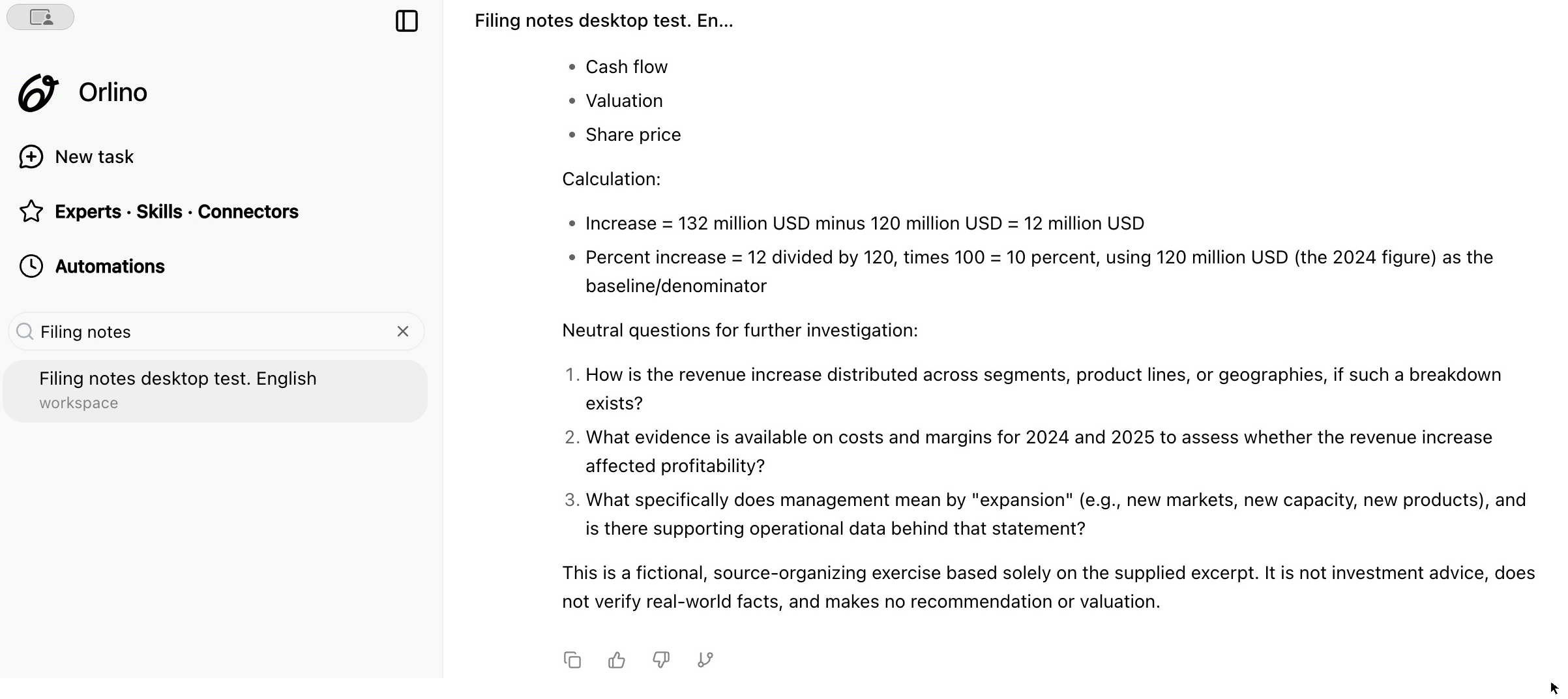
When you reopen your own work, read the original request and the latest relevant response. Compare the source material with what you remember. If the task produced files, inspect their filenames and contents before choosing a version.
Similar titles can belong to separate attempts at the same job. Once you've confirmed the context, you can continue from the earlier request in that conversation.
Clear the query when you want the full list
We tried an intentionally unmatched query, no-match-workshop-fixture-9147. The sidebar displayed “No matching sessions.”
An empty result only tells you that the query found no matching session in this view. Check the spelling or try another word from the title before assuming a conversation was deleted. You can also clear the search and look through the list.
Clear search removed the query and restored the full session list. The opened conversation stayed selected.
Keep the search claim within the tested scope
These checks covered known title fragments in a small set of desktop sessions, opening the results, a no-match query and clearing the search. We didn't test semantic search, message text, file contents, archived conversations, cross-workspace retrieval or offline behavior.
Read Orlino tips for reviewing chats and files for related ways to pick up earlier work. In Orlino, try a title fragment from a known task and check the conversation it opens.
About this article
Branding in selected screenshots has been updated. The captured interface and task content are unchanged.
Published by Orlino, based on recorded product tests using fictional or supplied sample material. The results and limits described apply to those tests; features and model availability may vary by build and account. Screenshots are cropped to remove unrelated account details; retained text is unchanged. See our editorial process.
Try your next task in Orlino.
Bring your notes, files, and questions to Orlino. Choose the app for your device.