


We used two fictional event plans with named owners, explicit handoffs and missing dates. The review checked whether the resulting checklist kept those facts and gaps intact.
Start with the handoff
Our first example was a club event. Maya had to confirm a room before Lee could send invitations. Neither dates nor task durations were available.
The result put room confirmation before invitations, assigned each task to the supplied owner, and marked both as Not started. It also asked what counted as room confirmation and whether invitations could be prepared while the room was pending. Those are questions a coordinator can take back to the team without treating an assumption as a decision.
The second example changed the handoff. Noor had to approve a tool list before equipment could be packed. The packing owner was unknown. Orlino kept that owner as Unknown and asked who should take responsibility. It did not assign the packing work to Noor just because Noor was already named.
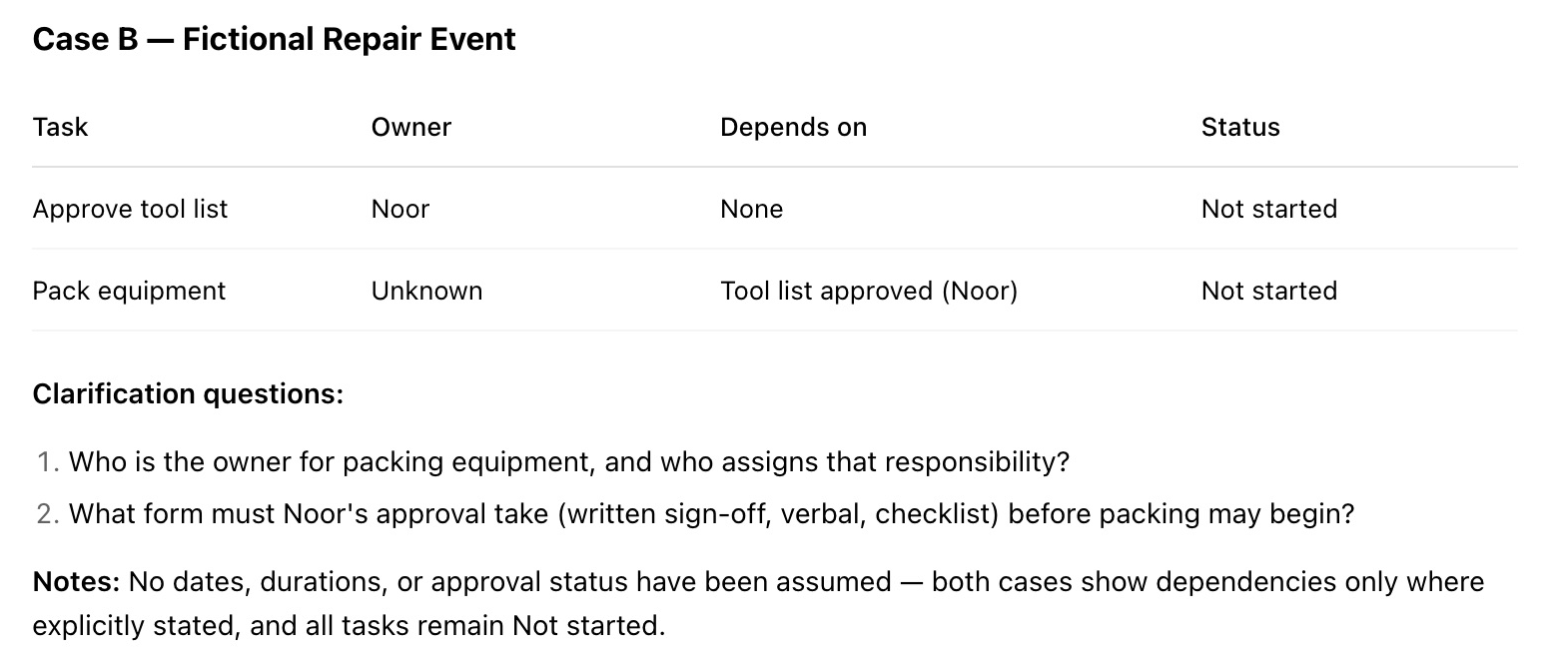
Try the project planning prompt
Open a new task, select Project Task Planner, and choose your model. We used GPT-5.6-Sol in the installed Orlino app, version 0.0.6.
Use only these project notes: [paste notes]. Draft a task table with Task, Owner, Depends on, and Status. Preserve explicit owners and prerequisites. Write Unknown for missing owners. Do not invent dates, durations or approvals. Add two clarification questions. Reply in English in this conversation; do not send messages or change external systems.Keep the first request limited to a reviewable plan. If you have a confirmed deadline, supply it explicitly. A named reviewer does not automatically become the owner of the next step.
Check the table against your notes
Read each dependency as a sentence: equipment packing depends on tool-list approval. Then trace it back to the source notes. This catches a reversed handoff even when the table itself looks tidy.
Check the owner column separately. Unknown is a useful result when it gives you a concrete assignment to resolve. Before sharing the plan, confirm that task status reflects actual progress and that any suggested next step is still a proposal.
The two checklists were delivered in chat and remained available after reopening. Assigning work to teammates, project-service updates, file export and scheduled execution were outside the test.
Try a project checklist in Orlino. Bring the notes you already have, then resolve the missing assignments with your team.
About this walkthrough
Published by Orlino Editorial from two recorded fictional chat cases in Orlino 0.0.6 with GPT-5.6-Sol on October 21, 2026. The starting prompt is adaptable. These examples establish only the described scope, not general model reliability. Screenshot text is unchanged; account controls are outside the crop. See our editorial process.
Try your next task in Orlino.
Bring your notes, files, and questions to Orlino. Choose the app for your device.
Keep reading
Add workflow handling time without claiming total turnaround
Map sequential work steps in Orlino, check their handling-time total, and keep waiting time and elapsed turnaround unknown when measurements are missing.
Read article Work & productivityUse a thinking partner to clarify a vague project request
Use Orlino as a thinking partner to turn a vague project request into five neutral questions before choosing a solution or assuming a cause.
Read article