


The constraint is simple: do not let the questions smuggle in a diagnosis. A question about why people keep abandoning a form assumes repeated abandonment. If that has not been established, start by asking what happens today.
Ask before choosing a fix
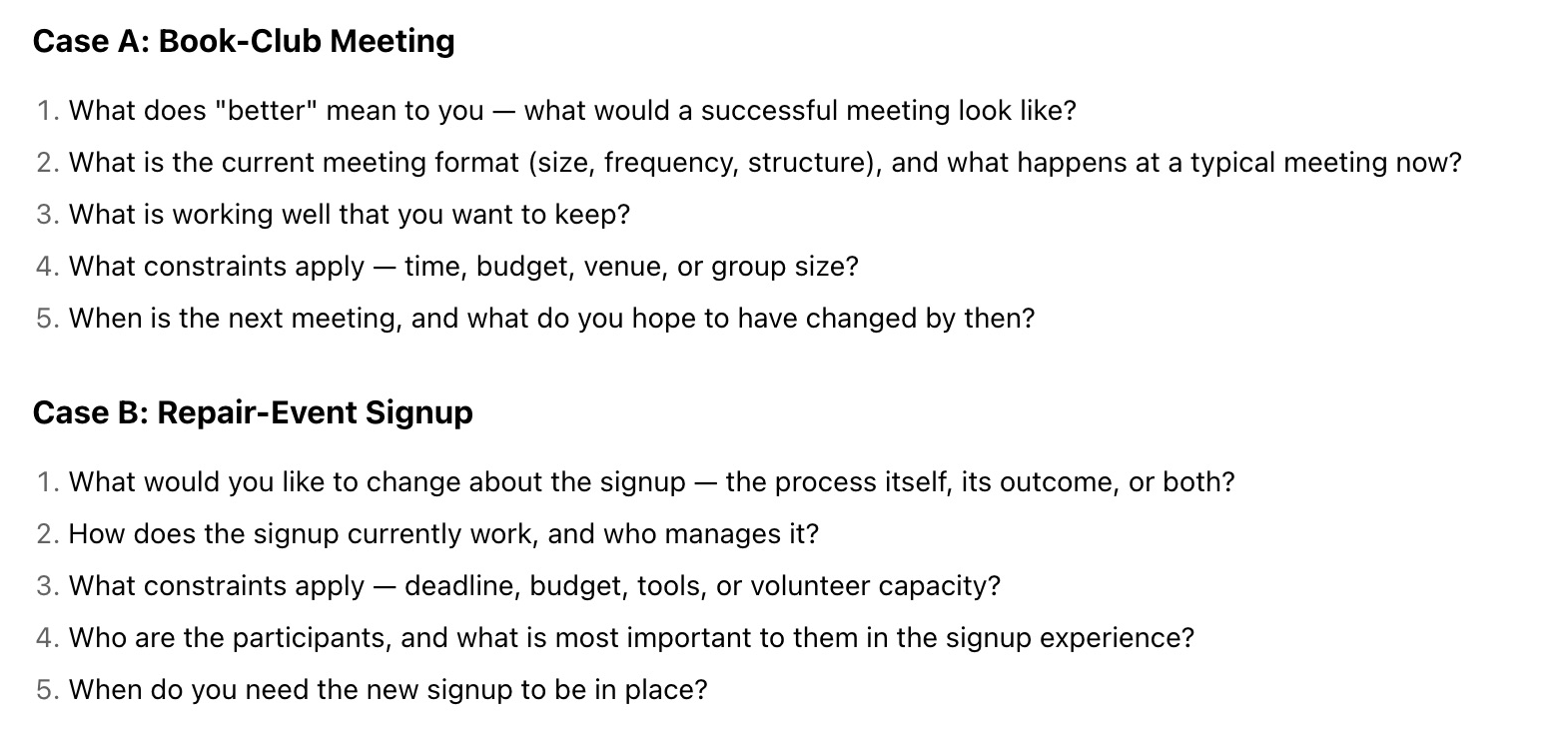
We tested two independent fictional requests: a book-club meeting and signup for a repair event. Both requests deliberately left important details open. The task asked for exactly five neutral clarification questions per case, without recommendations or a diagnosis.
Orlino returned five questions under each heading. For the book club, it asked, “What is working well that you want to keep?” For the repair event, it asked, “How does the signup currently work, and who manages it?” These questions invited the organizer to describe the situation before choosing a change.
That gives the requester a small next step: answer the questions and identify which details are facts, preferences or still unknown. A later planning task can use those answers without treating the first vague description as a complete specification.
Set a question-only boundary
Open a new task and select Thinking Partner. We used GPT-5.6-Sol in Orlino desktop version 0.0.6.
Here is a fictional request: [brief]. Ask exactly five neutral clarification questions. Do not propose solutions, diagnose a cause, assume urgency or describe actions as completed. Use only the supplied context. Reply in English with a case heading and questions only.Choose a small question limit so the requester can answer in one sitting. If an answer raises a new issue, use a follow-up conversation rather than turning the first response into an exhaustive questionnaire.
Read questions for hidden assumptions
Look for phrases such as again, still, failed or missed. They may be appropriate when the brief establishes that history; otherwise they deserve a closer look. Check that the questions give the requester room to disagree with the implied premise.
Both question sets remained available after reopening. They are a starting point for discussion, with no interview findings or observed user behavior behind them.
Clarify a project request in Orlino before deciding what to build or change.
About this walkthrough
Published by Orlino Editorial from two recorded fictional chat cases in Orlino 0.0.6 with GPT-5.6-Sol on October 21, 2026. The starting prompt is adaptable. These examples establish only the described scope, not general model reliability. Screenshot text is unchanged; account controls are outside the crop. See our editorial process.
Try your next task in Orlino.
Bring your notes, files, and questions to Orlino. Choose the app for your device.