


For this walkthrough, we used fictional tools with fit weighted at 60% and ease at 40%. The ratings were supplied inputs, not product reviews or ratings generated from vendor research.
Make the arithmetic visible
Alder scored four for fit and two for ease. Its total was 4 × 0.6 + 2 × 0.4 = 3.2. Birch scored three and four, giving 3.4. Orlino placed Birch above Alder on that scorecard and kept the component calculations visible.
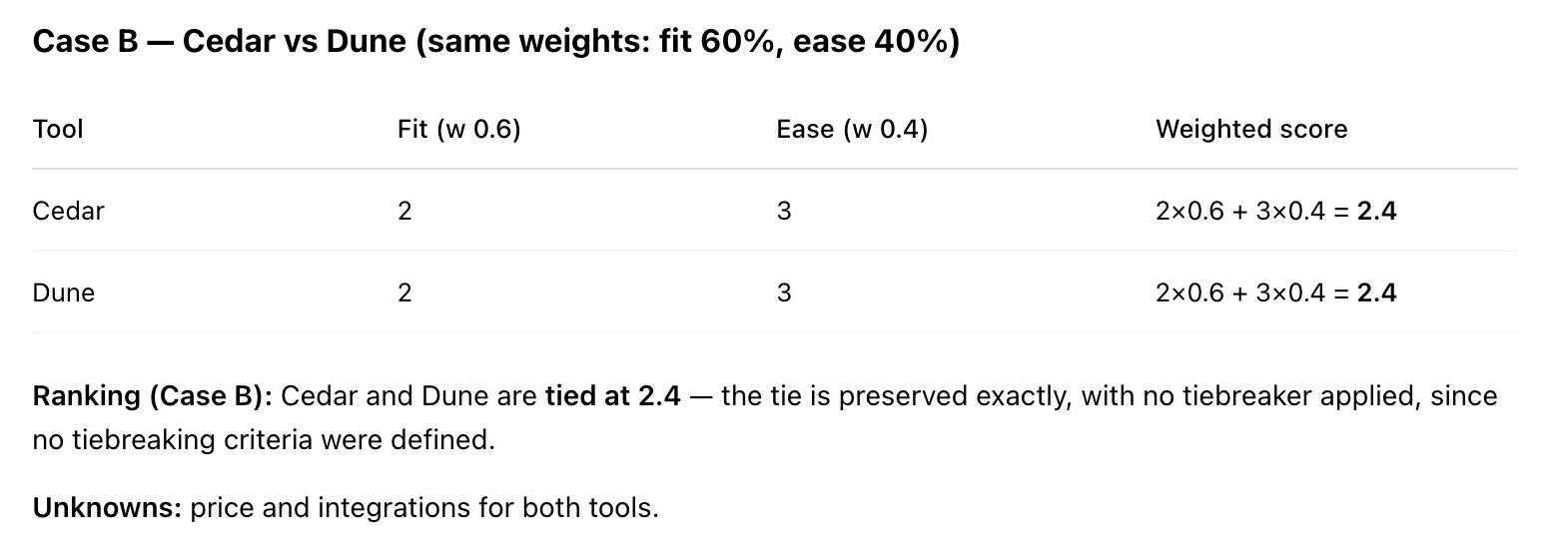
In a fresh case, Cedar and Dune both scored two for fit and three for ease. Both totals were 2.4. The response retained the tie instead of inventing another criterion to pick a winner.
Price and integrations were unknown for every tool. The output separated the score ranking from a buying decision, which remained open. A two-tenths lead on two supplied criteria tells a reviewer how the score was calculated; it does not establish overall suitability.
Use a fixed scoring prompt
Open a new task, select Tool Evaluation Expert and supply the same scale for every option. We tested with GPT-5.6-Sol in Orlino desktop 0.0.6.
Compare these fictional options using only the supplied scores: [options and ratings]. Apply fit 60% and ease 40%. Show every weighted calculation and the ranking. Preserve exact ties. Price and integrations are unknown. Separate the score outcome from a final buying decision. Reply in English in chat; do not browse or contact vendors.Keep weights fixed during a comparison. If the team changes them, record the new weights and run a separate comparison so the reason for a changed ranking stays visible.
Decide what the score leaves out
Check that weights total 100%, that all ratings use the intended scale and that the calculations match the inputs. Ask the team to resolve missing price, integration and real-workflow requirements before choosing a tool.
The scorecards remained available after reopening. Vendor research, integration tests and purchasing were outside this comparison.
Build a tool scorecard in Orlino using criteria your reviewers have agreed on.
About this walkthrough
Published by Orlino Editorial from two recorded fictional chat cases in Orlino 0.0.6 with GPT-5.6-Sol on October 21, 2026. The starting prompt is adaptable. These examples establish only the described scope, not general model reliability. Screenshot text is unchanged; account controls are outside the crop. See our editorial process.
Try your next task in Orlino.
Bring your notes, files, and questions to Orlino. Choose the app for your device.