


Keep the request tied to the interaction you know. Labels such as Archive or Return do not, by themselves, specify undo behavior, navigation or the message shown after confirmation.
Follow the selection gate
Our first fictional case was a reading app: select one item, click Archive and confirm. With no selection, Archive had to be disabled. Orlino kept that sequence and gave the empty-selection path its own ending at the disabled action.
The second case changed to equipment returns. It used select, Return and confirm, with Return disabled when nothing was selected. The response preserved the supplied label and sequence rather than carrying Archive into the equipment example.
Both outputs listed unanswered questions about cancellation, undo, bulk selection and post-confirmation feedback. Those questions were useful because the source notes had not defined those behaviors. The normal path stopped at the boundary of the supplied interaction.
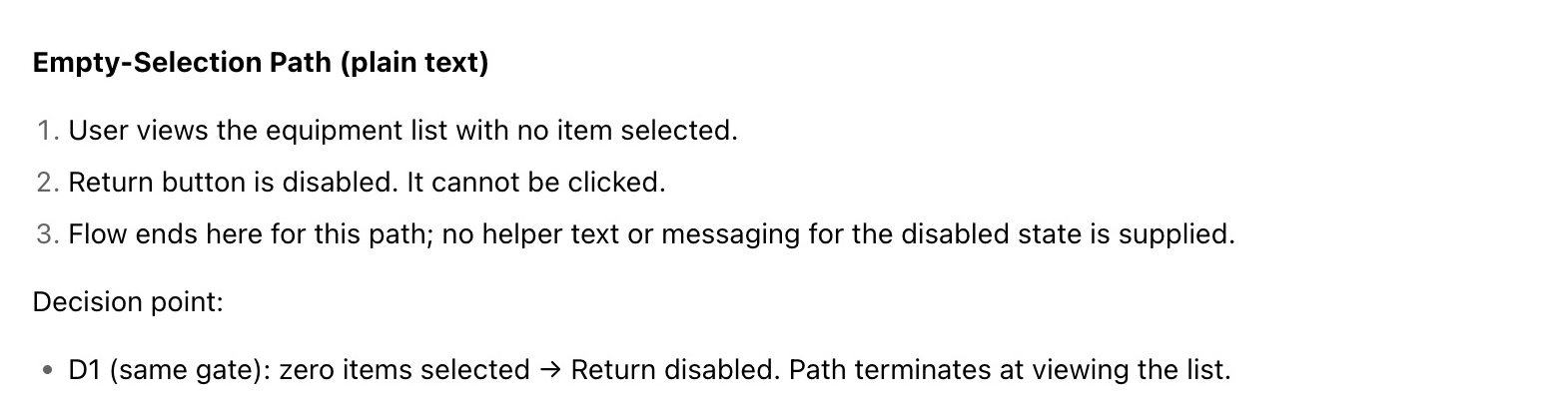
Ask for both paths
Select User Experience Architect in a new Orlino task. Our test used GPT-5.6-Sol in desktop version 0.0.6.
Map this fictional user flow in plain text: [selection, action and confirmation rules]. Show the normal path, the empty-selection path and decision points. Preserve supplied labels and order. List unknown cancel, undo, bulk and post-confirmation behavior as questions. Do not invent a completed implementation. Reply in English in chat.Use one action per step so a reviewer can follow the sequence. Give exact labels when they are settled; otherwise identify labels as proposals.
Walk the flow before drawing screens
Read the empty path from the first step and ask whether it requires an action that is unavailable. Then walk the normal path and locate the confirmation. Take unresolved behavior back to the specification owner before treating the flow as a complete interface contract.
The text flows were retained in the conversation. The fictional controls, accessibility and saved data still need implementation testing.
Map a user flow in Orlino with the boundary path included from the start.
About this walkthrough
Published by Orlino Editorial from two recorded fictional chat cases in Orlino 0.0.6 with GPT-5.6-Sol on October 21, 2026. The starting prompt is adaptable. These examples establish only the described scope, not general model reliability. Screenshot text is unchanged; account controls are outside the crop. See our editorial process.
Try your next task in Orlino.
Bring your notes, files, and questions to Orlino. Choose the app for your device.