


This is a planning workflow for a support team. The test did not create, move or answer live tickets.
Route known cases and preserve the fallback
Our first case supplied three rules: billing to Finance, bugs to Support and feature requests to Product. The fictional tickets concerned a duplicate charge, an export crash and a dark-mode request. Orlino mapped each ticket to the supplied category and owner.
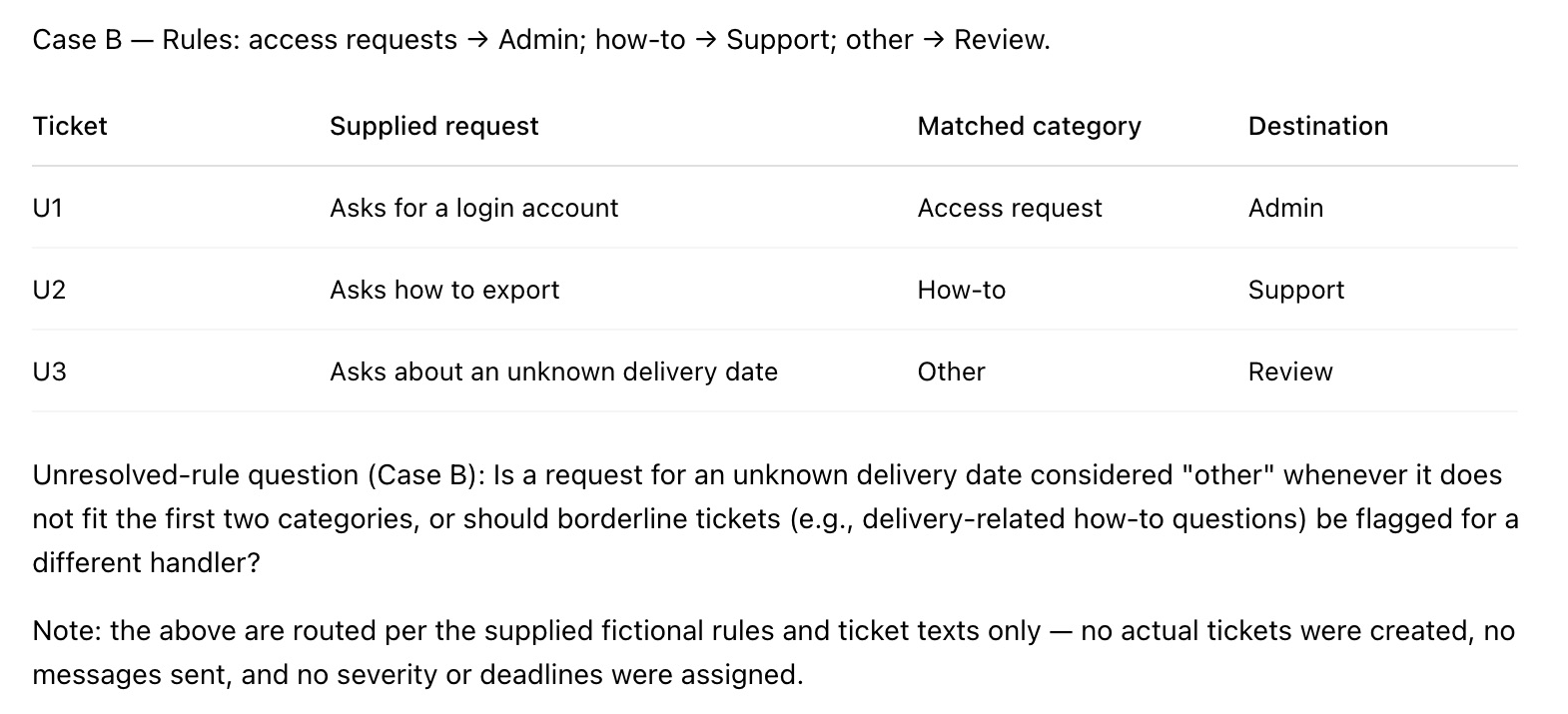
The second case changed the rules. Account access went to Admin, how-to questions to Support, and other requests to Review. The tickets covered account access, how to export and an unspecified delivery question. The last ticket stayed Other with Review as its destination.
The output also returned one unresolved-rule question per case. It did not add severity levels, response deadlines or customer replies, because those were outside the supplied routing rules.
Put the rulebook before the tickets
Open a new task and select Customer Support Systems Expert. Our cases used GPT-5.6-Sol in Orlino desktop version 0.0.6.
Use these routing rules: [category to owner mapping, including fallback]. Apply them to these fictional tickets: [IDs and text]. Return the ticket ID, category and owner. Do not add severity, deadlines or facts not in the ticket. Include one question about an unresolved routing rule. Reply in English in chat; do not access or update a ticketing service.A fallback destination gives genuinely unclear cases somewhere to go. It is more reviewable than assigning a new team because the ticket contains an unfamiliar word.
Check ambiguous requests before automation
Trace each proposed owner to a supplied rule. Review any ticket that could fit more than one category, and decide whether the rulebook needs an explicit priority. Keep the original ticket ID and text available for that review.
All six proposed routes remained available in chat. A live queue, ticketing integration and service-level performance were outside this test.
Draft support routing in Orlino with a small fictional sample before applying the rules to your own queue.
About this walkthrough
Published by Orlino Editorial from two recorded fictional chat cases in Orlino 0.0.6 with GPT-5.6-Sol on October 21, 2026. The starting prompt is adaptable. These examples establish only the described scope, not general model reliability. Screenshot text is unchanged; account controls are outside the crop. See our editorial process.
Try your next task in Orlino.
Bring your notes, files, and questions to Orlino. Choose the app for your device.